Dynamo: Generate an initial model
Subtomogram extraction at bin 8
- Source the params script.
source params.sh - Export the subtomograms with
WarpTools:cd $ROOT/warp # Compute angpix binned by 8 and box diameter (floor) ANGPIX_BINNED=$(echo "$ANGPIX * 8" | bc) BOXDIM=$(awk "BEGIN { print int($ANGPIX_BINNED * $BOXSIZE) }") # Export particles WarpTools ts_export_particles \ --settings warp_tiltseries.settings \ --input_star particles_warp.star \ --output_star relion3_b8_particles.star \ --coords_angpix $ANGPIX \ --output_angpix $ANGPIX_BINNED \ --box $BOXSIZE \ --diameter $BOXDIM \ --relative_output_paths \ --3d \ --output_processing bin_8_3dThis will take a few minutes.
- Run the python script
convert_warp_to_tbl.pywhich does the following:- Creates a
dynamosubfolder - Adds tilt, psi priors to relion3_bin8_particles.star
- Convert to tbl with warp2dynamo
- Edits tbl file to include min and max tilt angle and helical tube ID.
cd $REPOSITORY python3 convert_warp_to_tbl.py \ -r $ROOT/warp \ -i relion3_b8_particles.star particles_warp.star \ -o relion3_b8_particles_merged.star \ -t processing/tomostar/$TOMONAME'_ali.tomostar' \ -bs $BOXSIZE -b 8 - Creates a
- Do CTF correction of the extracted particles with
correct_ctf_subtomo.py:conda activate tomotools cd $REPOSITORY python3 correct_ctf_subtomo.py \ -r $ROOT/warp \ -s relion3_b8_particles_merged.star \ -t dynamo/particles_b8_edit.tbl \ -o dynamo/filamentsData_b8_ctf/ \ --bpf 0.002 0.5 \ --ctf_method wiener \ --wiener_epsilon 0.1 \ --nproc 54This will take a few minutes with 54 processes.
Initial average at bin 8
-
Move into
warp/dynamoand create a project directory calleddynamo_project_b8:source params.sh # if you hadn't done it yetcd $ROOT/warp/dynamo mkdir -p dynamo_project_b8 && cd dynamo_project_b8 cp ../particles_b8_edit.tbl ./particles_b8_edit.tbl mv ../filamentsData_b8_ctf ./With the dynamo software, randomize the azimuth (=rot) angle and make a first average:
dynamoT = dread('particles_b8_edit.tbl');T2 = dtrandomize_azimuth(T);dwrite(T2,'particles_b8_edit_mod.tbl');Generate average (should be a tube)
oa = daverage('filamentsData_b8_ctf','t','particles_b8_edit_mod.tbl','mw',50);dwrite(oa.average,'raw_template_ctf.em');Check the output volume
raw_template_ctf.emin ChimeraX. In ChimeraX, don’t forget to flip the volume:
vop scale #1 factor -1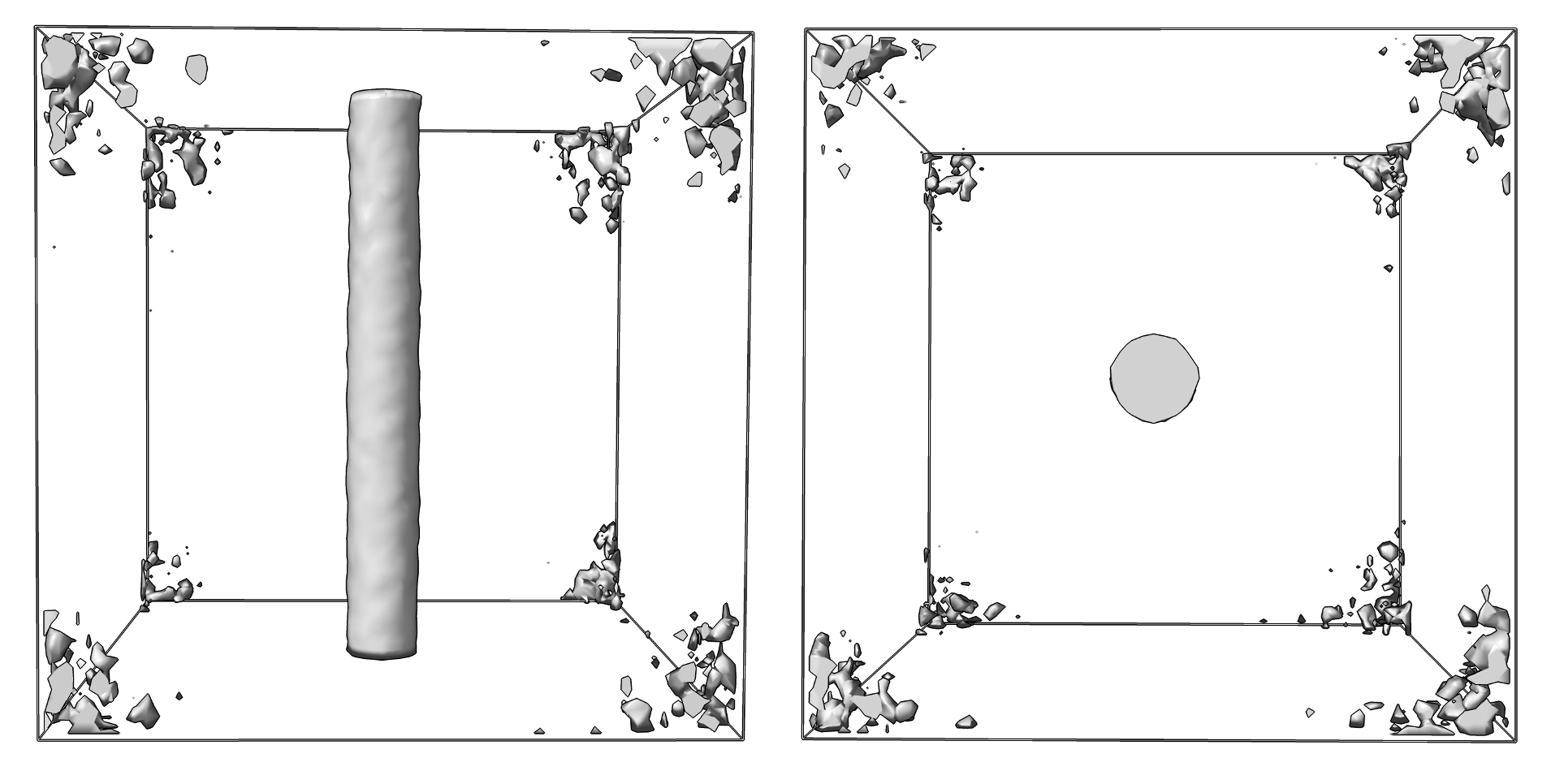
Particle alignment at bin 8
- Generate a new dynamo project with the tube as a template:
dcp.new('bin8_align_1', 'd', 'filamentsData_b8_ctf','template','raw_template_ctf.em','masks','default','t','particles_b8_edit_mod.tbl');dcp bin8_align_1The dynamo window will open.
-
Generate a mask: Click on “masks”, then “masks editor”.
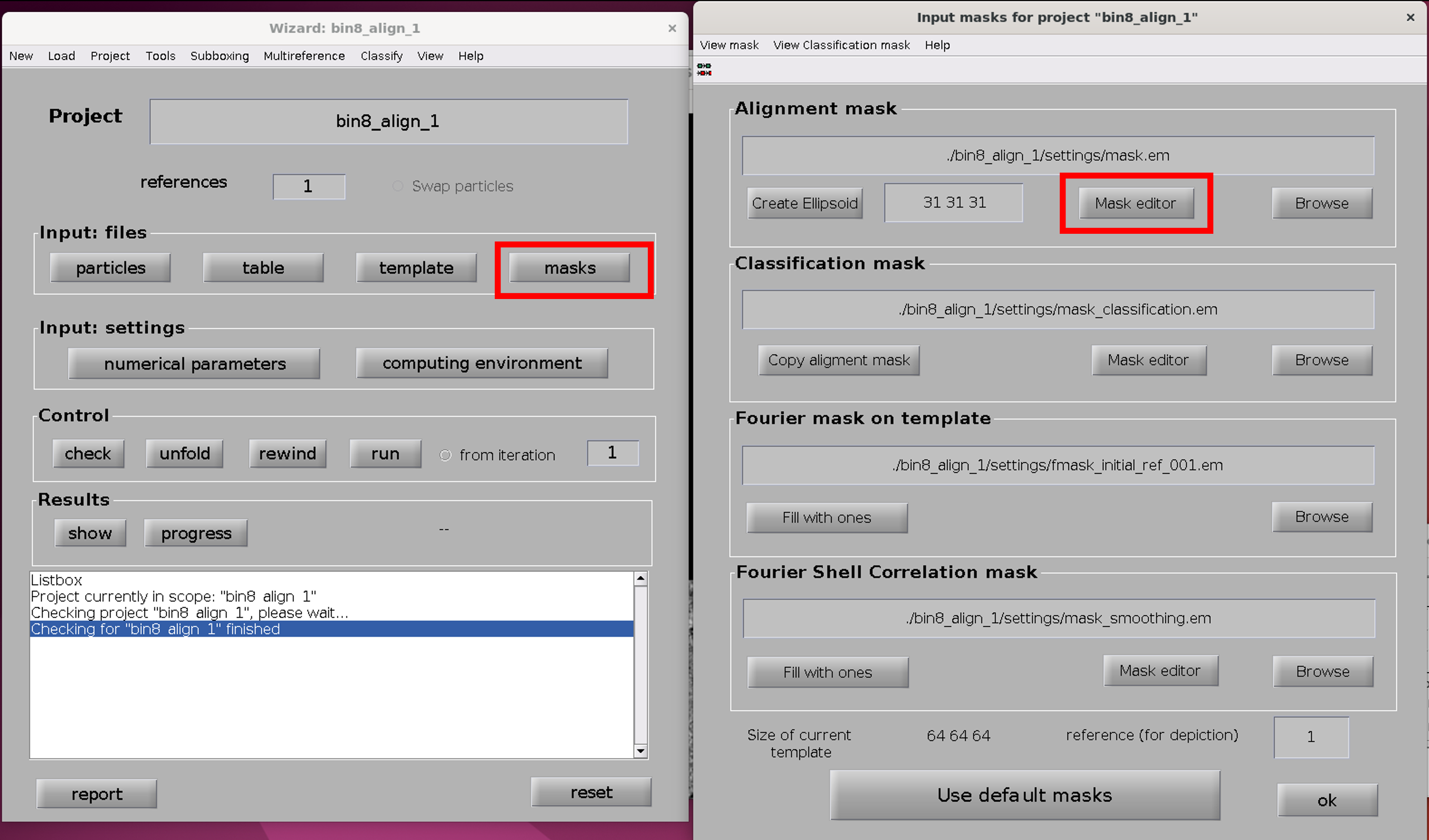
Generate a mask with the following specifications:
Parameter Value r 15 h 50 Gaussian 3 Then, click “create mask”, and you can “view” it to check. Once you are happy, click “Transfer mask to Wizard” (top left) and hit all 3 options individually (alignment mask, classification mask and smoothing mask). Close the mask editor.
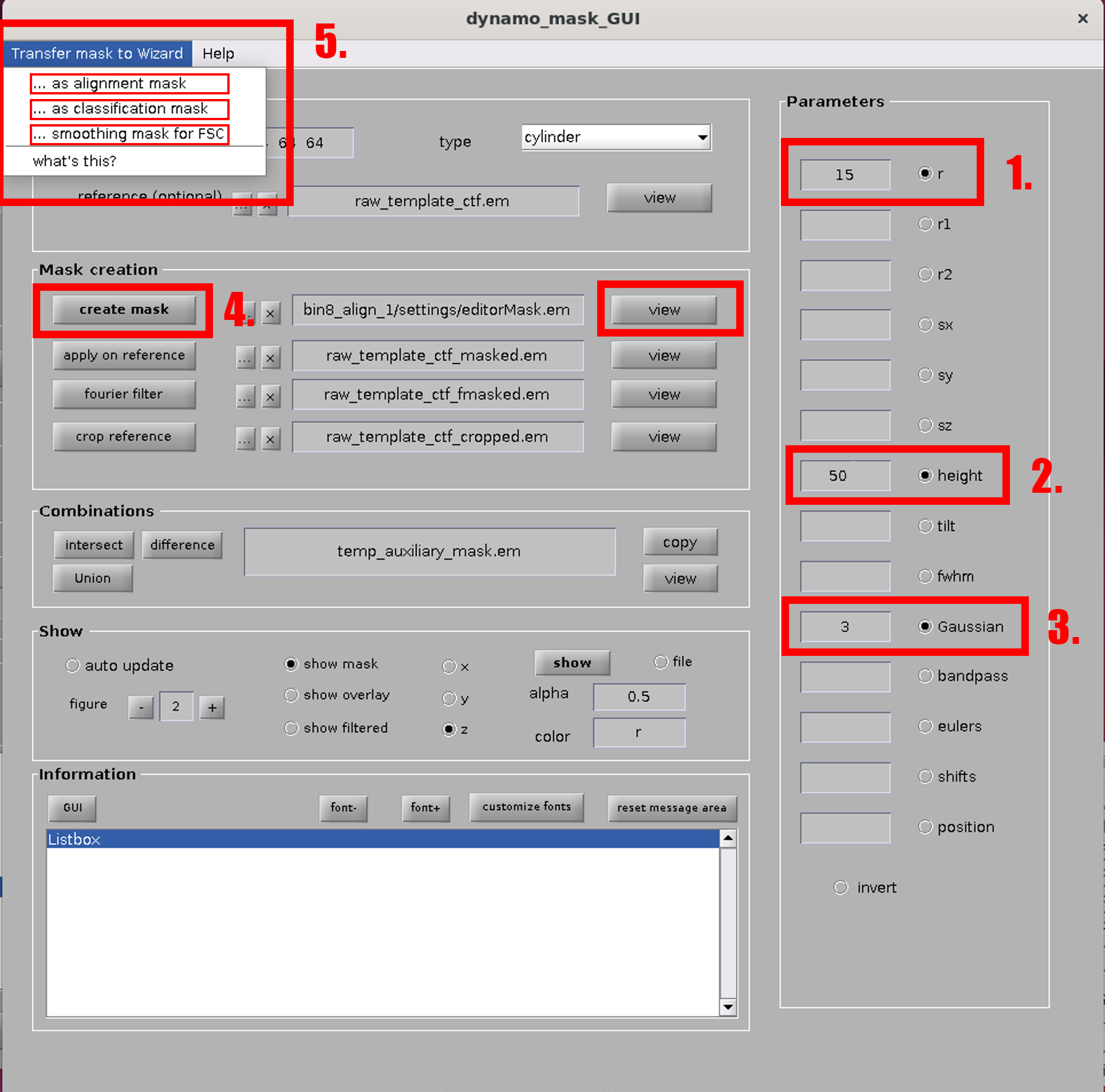
-
In the “Input mask” window, hit “Fill with ones” for “Fourier mask on template”, then OK:

-
Set the numerical parameters of the alignment (only the parameters to change are listed, leave the rest default):
Parameter round 1 round 2 iterations 2 2 cone aperture 20 20 cone sampling 3 3 Advanced: cone flip 1 1 azymuth rotation angle 360 45 azymuth rotation sampling 15 5 refine 2 2 refine factor 2 2 high pass 2 2 low 25 25 particle dimensions 64 64 shift limits 4 4 2 4 4 2 shift limiting way 4 4 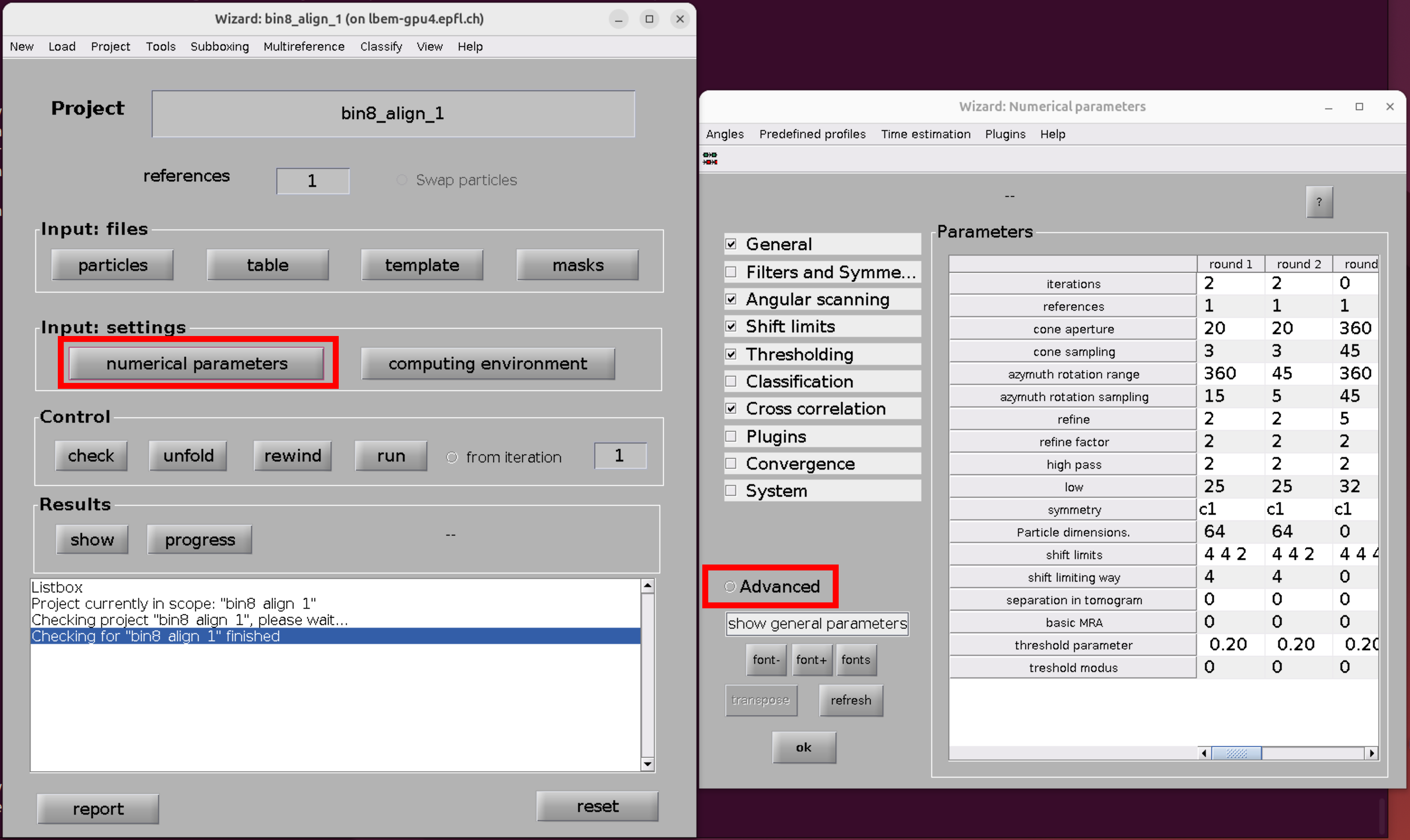
-
Set the computing environment to the specifications of your computing system.
In our case: GPU standalone,Parameter Value GPU identifier 0 1 2 3 CPU core 1 Parallelize 50 -
In the dynamo main window, hit “check”, then “unfold”. Close dynamo.
- In the terminal, leave the dynamo environment (
ctrl + c) and run the project executable:./bin8_align_1.exeand wait for the alignment to finish (can take >8 hours with ~7000 particles).
Search for Symmetry
-
When you see helical symmetry in your average, search for that symmetry:
cd $ROOT/warp/dynamo/dynamo_project_b8# Copy the volume and tbl file of the last iteration to your dynamo project folder cp bin8_align_1/results/ite_0004/averages/average_ref_001_ite_0004.em ./ cp bin8_align_1/results/ite_0004/averages/refined_table_ref_001_ite_0004.tbl ./# Convert .em volume to .mrc e2proc3d.py --mult=-1 average_ref_001_ite_0004.em average_ref_001_ite_0004.mrc# Set pixel size relion_image_handler --i average_ref_001_ite_0004.mrc --o average_ref_001_ite_0004.mrc --force_header_angpix $ANGPIX_BIN8# Search symmetry in Relion relion_helix_toolbox --i average_ref_001_ite_0004.mrc --twist_min 0.5 --twist_max 2 --rise_min 4.5 --rise_max 4.9 --z_percentage 0.3 --search --cyl_outer_diameter 200 --angpix $ANGPIX_BIN8# Impose symmetry relion_helix_toolbox --i average_ref_001_ite_0004.mrc --twist 1.01 --rise 4.8 --z_percentage 0.3 --impose --cyl_outer_diameter 200 --angpix $ANGPIX_BIN8 --o average_ref_001_ite_0004_sym.mrc# Set pixel size back to 1 for Dynamo relion_image_handler --i average_ref_001_ite_0004_sym.mrc --o average_ref_001_ite_0004_sym.mrc --force_header_angpix 1# Convert .em back to .mrc for Dynamo e2proc3d.py --mult=-1 average_ref_001_ite_0004_sym.mrc average_ref_001_ite_0004_sym.em
Gold-standard refinement at bin 8
- To generate two half particle sets fo the gold-standard FSC calculation, we need to make sure that particles originating from the same filament end up in different particle sets.
cd $REPOSITORY

python generate_goldstandard_tbl.py --i $ROOT/warp/dynamo/dynamo_project_b8/refined_table_ref_001_ite_0004.tbl
This will generate a new file,
refined_table_ref_001_ite_0004_mod.tbl, where particles of different filaments are listed in an alternating fashion. - Create a new dynamo project in
dynamo_project_b8:cd $ROOT/warp/dynamo/dynamo_project_b8 dynamodcp.new('abp_align', 'd', 'filamentsData_b8_ctf','template','average_ref_001_ite_0004_sym.em','masks','default','t','refined_table_ref_001_ite_0004_mod.tbl');Generate a new, smaller mask (see dynamo instructions above):
Parameter Value r ~12 h 30 Gaussian 3 And use the following numeric parameters:
Parameter round 1 iterations 4 cone aperture 20 cone sampling 3 Advanced: cone flip 2 azymuth rotation angle 180 azymuth rotation sampling 15 Advanced: azymuth flip 2 refine 3 refine factor 2 high pass 2 low 25 symmetry c1 or h[-1.01,0.3] particle dimensions 64 shift limits 4 4 2 shift limiting way 4 You can apply helical symmetry, but note that the sign of the twist is opposite of that in Relion, and that the rise is defined in pixels, not in Angstrom.
Now, adopt 2 references and particle sets:
- multireferece > adaptive filtering….. > Derive a project
- change project name to abp_align_eo
-
multireferece > adaptive filtering > Edit for adaptive run:
Parameter Value threshold 0.143 low-pass reolution 25 push back 0
Then check and unfold the project, and run the executable:
./abp_align_eo.exeInspect the two half-maps once the job is done. If it looks reasonable, you can move on to the next binning.